How the reaction time test works
The Perceptle reaction time test is the simplest thing you can ask of your senses: watch a panel, and tap the moment it changes color. The wait before the change is random, somewhere between a second and a half and four seconds, so there is no rhythm to learn. When the color arrives, tap the board or press the space bar.
Your result is the gap between the change and your tap, measured in milliseconds. A thousand milliseconds make a second, so a time of 250 means a quarter of a second passed between the color appearing and your finger landing. That gap holds everything: your eyes noticing the change, your brain deciding it is the real thing, and your hand moving.
Each round of the reaction time test takes about five seconds. On this practice page the rounds keep coming, a little harder each time, so you can find your typical speed rather than a lucky one.
Reaction time scores: what counts as fast
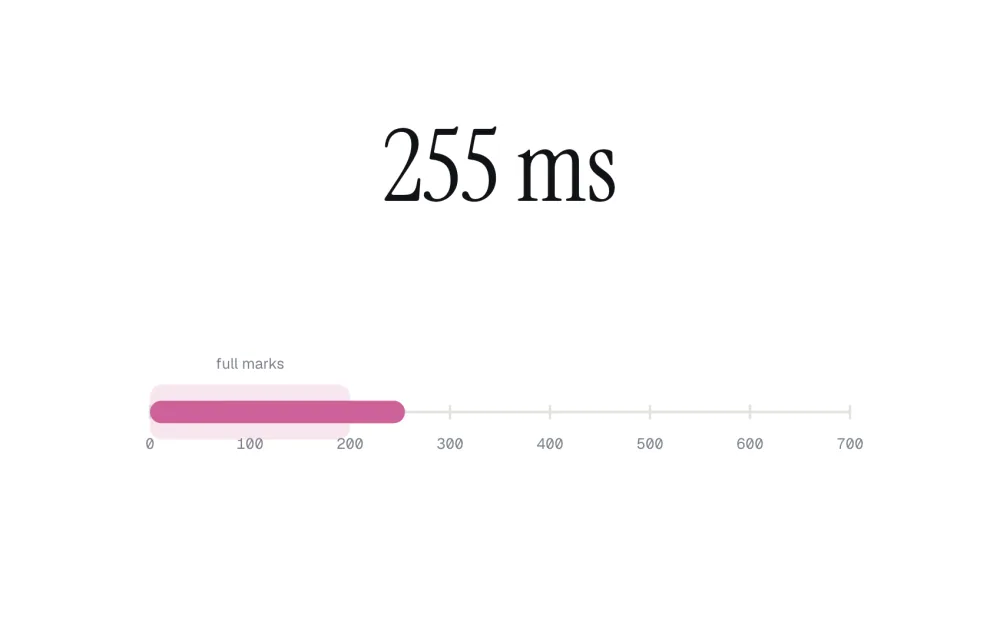
Every Perceptle test is scored out of 100, and this one is generous at the top. Any reaction up to 200 milliseconds scores a full 100. After that the score falls away smoothly, so a slightly slow tap costs a little and a very slow one costs a lot.
| Your time | Score |
|---|---|
| 200 ms or faster | 100 |
| 265 ms | 88 |
| 330 ms | 61 |
| 400 ms | 31 |
| 460 ms | 14 |
The reveal draws your time on a scale from 0 to 700 milliseconds, with the full-marks band shaded, so you can see at a glance how far past it you landed. Most people land between 230 and 330 milliseconds on a first try at a reaction time test like this one.
False starts and decoy flickers
Tap before the color changes and the panel tells you it was too soon. That is a false start. You get one more try with a fresh wait, and a second false start scores zero for the round.
There is a second kind of false start. Nobody can see a change and respond in under a tenth of a second, so a tap that lands within 100 milliseconds of the change counts as a guess, not a reaction. This keeps the reaction time test honest: hammering the screen in rhythm cannot win.
Harder rounds add decoys: brief gray flickers during the wait that look like the start of a change. Only a real color change counts. Learning to ignore the decoys without slowing down for the real signal is the skill these rounds train.
What is a normal reaction time?
For a simple visual signal like this one, young adults typically react in 200 to 300 milliseconds. Reaction time slows gradually with age, and it is slower when you are tired, distracted or reacting to something in the corner of your eye. It gets faster with practice and with attention, up to a point that is different for everyone.
Your device adds a little time of its own. A screen that refreshes 60 times a second shows the change up to 16 milliseconds late, and touchscreens, keyboards and mice each add a few milliseconds more. That is why a reaction time test result on one device is best compared with results on the same device.
Researchers call this kind of task simple reaction time: one signal, one response, no choice to make. Tests that ask you to pick between responses, or to hold back from a decoy, measure something a little different, which is why the decoy rounds feel harder.
How to get faster
- Rest a finger on the screen or on the space bar before the round starts, so the tap is the only movement left.
- Look at the middle of the panel and keep your eyes still; a change is easier to catch in the center of your view.
- Keep the wait relaxed. Tension makes false starts more likely, and a false start costs more than a slow tap.
- Treat a gray flicker as noise. Only a real color counts, so wait for color, not for movement.
- Play a few rounds before you judge yourself. Your third reaction time test result says more than your first.
Reaction time in the daily Perceptle
This reaction time test is one of twelve perception tests in Perceptle, a free daily game of ten quick tests. Most days the daily lineup includes it, and its place in the lineup sets how hard it is: early in the set there are no decoys, near the end there are two.
If you like this one, try the time perception test, which asks you to hold a button for an exact time with no clock, or the visual memory test, which flashes a handful of dots and asks where one of them was. Unlimited mixes all twelve into endless rounds.
Questions and answers
What is a good score on this reaction time test?
Anything up to 200 ms scores 100. Under 250 ms is quick, 265 ms scores about 88, and 330 ms about 61.
Why was my very fast tap a false start?
No one can see a change and respond in under a tenth of a second. A tap that fast was already on its way before the color changed, so it counts as a guess.
Does the space bar work?
Yes. On a computer, the space bar works just like tapping the panel, and it is often a little faster than a mouse click.
Is a phone slower than a computer?
Often a little. Touchscreens add some delay of their own, so compare your times on the same device.
How is this reaction time test different from the one in the daily game?
It is the same test. Here the rounds repeat and get harder each time; in the daily Perceptle it appears once, at a difficulty set by its place in the lineup.
Is it free?
Yes. Perceptle is free in any browser, with no account and nothing to install.
Ready for all ten?
The reaction time test is one of ten quick tests in today's Perceptle. See how sharp your senses are across time, color, memory and space.
Play today's Perceptle